
In recent months, a phishing campaign has been detected that has successfully fooled many users. This time the attackers have refined their techniques and are using emails that pretend to be official communications from the Human Resources department. The goal: to steal corporate credentials.
What is phishing and how has it evolved?
Phishing is a digital deception technique that seeks to obtain confidential information, such as passwords or banking details, by posing as legitimate organizations. The practice is not new, but what has changed is its level of sophistication.
In this recent campaign, cybercriminals have combined traditional phishing with spear-phishing at scale techniques, personalizing both the content of the email and the attached document.
The trick: a fake HR policy update
The attack begins with an email that appears to come from Human Resources. The message informs the employee about changes to remote work protocols, benefits and security rules. Everything looks legitimate: the email includes the recipient's name, a banner indicating that the sender is verified, and an attachment titled with the user's name.
This kind of presentation builds trust. The green banner indicating that the sender is on a safe list can look convincing, but it is actually part of the deception.
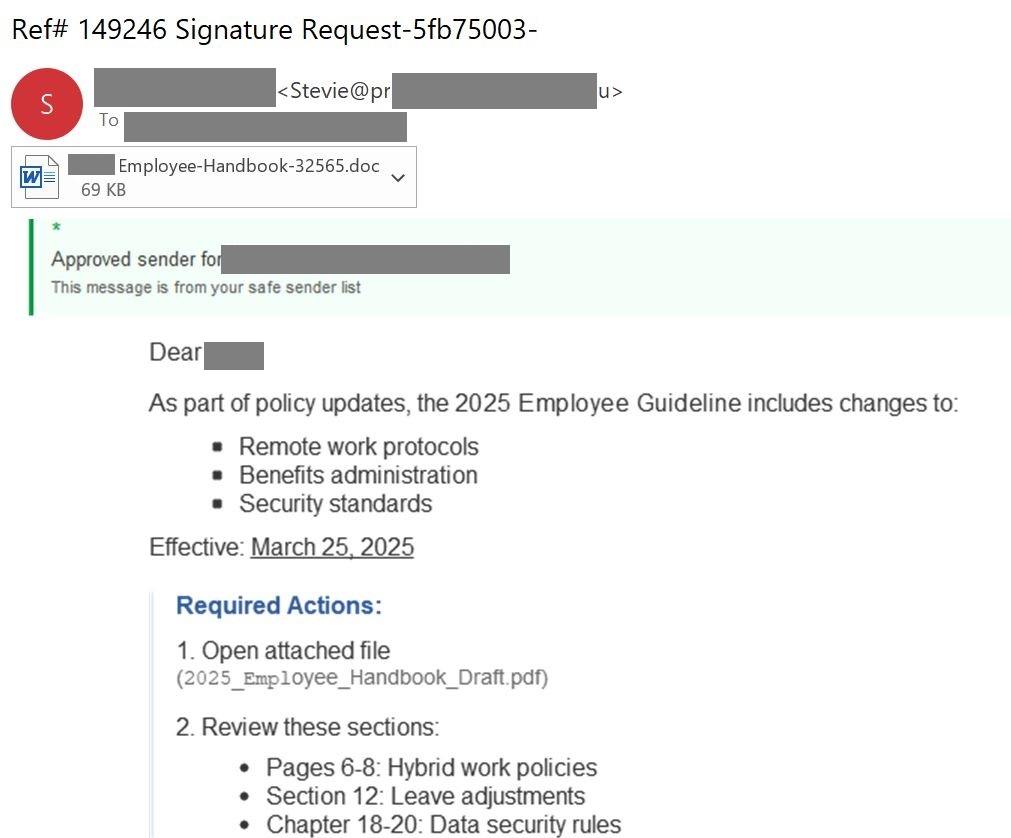
A fraudulent email designed to deceive recipients with supposed updates to Human Resources policies.
What is behind the email?
Although the message looks authentic, there are clear signs that it is a scam. The entire content of the email is an image, which makes it impossible to select the text with the mouse. This technique is used to keep antispam filters from detecting the fraud.
On top of that, the name of the attached file does not match what is mentioned in the body of the email. These are subtle details, but important ones.
🔍 Suspicious signals in the image:
- An odd reference in the subject line: “Ref# 149246 Signature Request-5fb75003-” is not typical of internal communications.
- An attachment with a .doc extension: Word documents can contain malicious macros. Internal policies normally use secure PDFs.
- Urgency and specific actions: “Required Actions” and the instruction to open the file are classic phishing tactics.
- A partially visible email address: There is no way to confirm whether it belongs to a legitimate corporate domain.
- A message about an “Approved sender”: This can be manipulated to create a false sense of security.
The attached document: a well-designed trap
When the file is opened, the user finds a cover page with the company logo and the title “Employee Handbook”. There is also a table of contents with sections marked in red, indicating supposed changes. Then a page appears with a QR code that promises access to the full document.
The trick is in that code. When it is scanned, the user is redirected to a page that asks them to enter their corporate credentials. This is the real objective of the attack.
The document is designed to look personalized. The recipient's name appears twice, and the file name also includes it. All of this reinforces the impression that this is a legitimate communication.
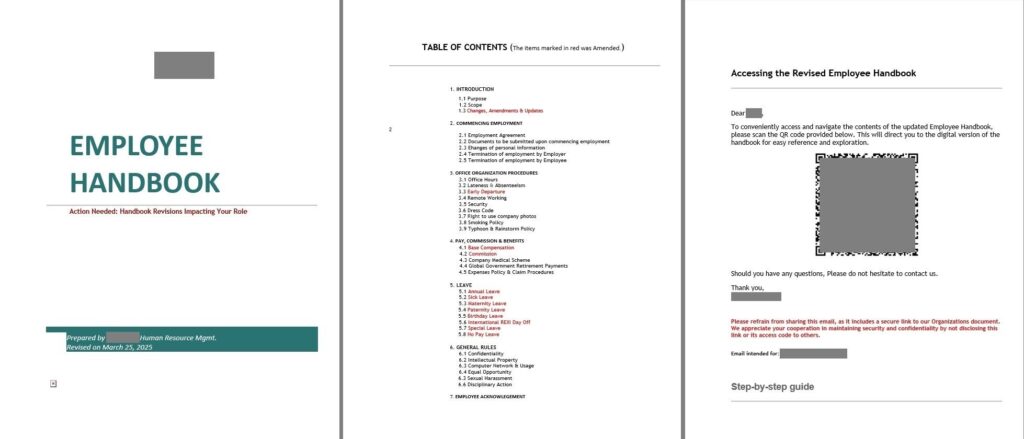
The document used by the attackers to lure in the victim
Why is this method so effective?
Personalization is the key. The attackers have created unique documents for each recipient, which suggests the use of an automated system capable of generating personalized emails and files. This increases the likelihood that the user will trust the content and fall into the trap.
This level of detail makes the attack harder to detect. The professional appearance and the personalization make the email look authentic, even to experienced users.
How can you protect yourself?
The best defense against this kind of attack is prevention. A sound strategy includes:
- Using specialized security solutions that block malicious emails before they reach the user's inbox.
- Protecting every device used for work, including mobile phones. More information here.
- Educating employees about modern scam tactics. Sharing resources and building cybersecurity awareness is essential. One excellent option is the Kaspersky Automated Security Awareness Platform.
Phishing campaigns are becoming more sophisticated all the time. This new approach, which simulates HR updates, shows that attackers are investing time and resources into deceiving users. The key is to stay alert, verify every detail and have the right protection tools in place.
It is not enough to trust the appearance of an email. If something looks suspicious, the safest course is not to open it and to report it to the security team. Education and prevention are our best weapons against phishing.